I've just been in it
Halfs SEO Notebook
Search Engines | Blogs | Marketting | PHP/MYSQL | CSS
How To Exploit The PageRankBot Tool
Building a good house means more than buying a pine dining table or 1080p Plasma TV (more quality content) or telling your friends about the new house youre building (marketing). You gotta know how to use hammers, drills and nails too.
If you rather build a good site than worry about supplemental results, why are you reading SEO blogs? Come on, be honest. Whens the last time you read an SEO blog that talked in-depth about optimizing a dynamic page for fast page loads or repeating graphic elements on a page to create a sense of unity or using element size and position to establish a visual hierarchy?
Never, right?
But if youre a control freak like me, read on.
WTH Does It Do?
Though some of you guys gave me positive feedback via comments and email about
PageRankBot, Im not sure if all of you know exactly what to do with it.
Inspite of the misleading name Supplemental Results Detector, its not a tool for detecting supplemental results. You have site:
www.domain.com/& and site:
www.domain.com/* for that. There are also other tools out there (I think Aaron Wall has one and
sitemost just came out with a new tool).
I dont really care how many of my pages are supplemental, but I do care when a page that deserves to rank in the SERP goes supplemental. One way to address that problem is PageRank distribution management. Thats what I built this tool for.
Tactics
First, figure out which pages on your site are important and which pages arent. Ask yourself
is this page valuable to my visitors? If the answer is no, the page can go. You might also ask yourself
what is this page supposed to rank for? If the answer is contact me or privacy policy then ask yourself
why the hell would I want traffic for privacy policy and am I out of my mind thinking I can rank on the first page for privacy policy alongside Google, Sun, Apple, Adobe, and NY Times?
But if your contact me page contains your email address or IM information and your clients find you by Googling for your contact info, I would keep the page in the main index.
To mark unimportant URLs, multi-select URLs that are unimportant, then Edit > Toggle Importance.
Now flag supplemental URLs. Some of you wish the tool does this for you automatically. It doesnt. Instead, label URLs returned by site:
www.domain.com* command by going to Edit > Mark Page As > Main Index.
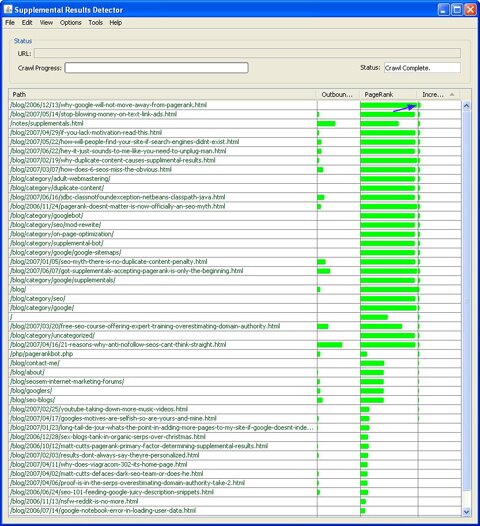
You can use the search tool to find URLs. For example, the following image shows a search on seo4fun.com for urls containing the word pagerank:
Now go to View > Filters > Hide Marked, which hides all the URLs you just marked. Select all the URLs you see, and then set their status to supplemental.
Find Your Link Targets
To manage internal PageRank flow, you add internal links to your site. Decide which page youre going to add a link on (link source) and which page you want that link to point to (link target).
To fish out your link targets, view only supplemental pages and sort them by PageRank (View > Filters > Show Supplementals and then click on the PageRank column). The topmost URL marked important is your best candidate:
1. The page is important to you (you feel the page deserves to rank in the SERPs).
2. The page is supplemental.
3. The page with the highest PageRank = easiest url to pull back into the main index.
Theres your link target.
Note: If your site has multiple entry points (i.e. not all inbounds point to the home page), PageRank flowing into your site from those entry points will change the dynamics of how PageRank is distributed. In that case, take the PageRank values this tool gives you with a grain of salt.
If youre anal enough to want to account for IBLs pointing at specific pages, then you can add juice by going to Tools > Simulate Backlinks. First, set the home page TBPR (use a float, like 4.2 for more accuracy). Go to View > Column Filters > Approximate TBPR. That will show you approximate TBPR numbers translated from raw PageRank numbers. Choose a URL, and adjust as needed using the + and - keys.
Find Your Link Sources
Theres a few ways to figure out your link sources. One way is to find the page with the most PageRank bleed. (Dont believe PageRank bleeds? Well argue about that in another post). Amount of PageRank bleed depends on percentage of outbounds to inbounds and a URLs (non-visible) PageRank. For example, a PageRank X URL with two outbound links and two internal links would bleed (X/4)*2 PageRank. Bigger X (increased number/quality of IBLs pointing to a URL) means more PageRank bleed. More internal links means less PageRank bleed, even if the number of outbound links stay the same.
Lets not get too obsessed with PageRank bleeds though. You can solidify Googles trust in your links by linking out organically. A site that doesnt link out needs a strong set of credible, trusted IBLs to validate with Google (e.g. amazon.com). Consider your outbound links a part of your link profile and a key ingredient in proving to Google that your linking habits are 100% natural with no artificial colors, flavors or sweeteners (yeah, I know that was bad).
Link from Pages with the Highest PageRank Bleed
First, limit results to URLs in the main index by going to View > Filter > Main Index Only, so you only link from URLs in the main index. Then sort by Outbound PageRank (click on the Outbound PageRank column header. If you dont see the colum displayed, go to View > Column Filter to activate). The topmost URL with the biggest outbound PageRank is your link source.
Link from Pages that Flow the Most PageRank
Another way is to find a page with that flows the most PageRank with each link. Go to View > Filter > Main Index Only. Then click on the Increment column header, which sorts the result in the order of PageRank flowing per link. The topmost URL with the biggest Increment bar is your link source.
Connect the Dots