how do i get rid of posts appearing below my page in search?

there are some posts/pages I dont want to appear below my listing when i search for my biz. I'm sure there is a way to do it but when i google the only results i get are posts about removing urls from google which I dont want to do. See pic for more info. I want to be able to exclude some posts circled in red from appearing in that list, but not from google.
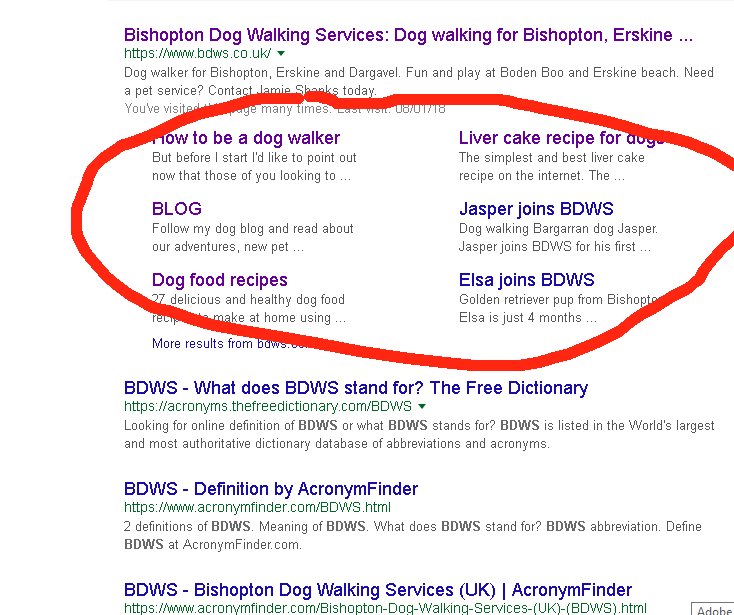
Image4.jpg
 

fisicx

Moderator
Sep 12, 2006
46,820
8
15,454
Aldershot
www.aerin.co.uk
You can’t. If you don’t want these to appear you need to block the search engines from indexing the site.
 
Upvote 0

fisicx

Moderator
Sep 12, 2006
46,820
8
15,454
Aldershot
www.aerin.co.uk
Agreed, but it's not easy and you can really mess up your ranking if you get it wrong.
 
Upvote 0

Alan

Free Member
  • Aug 16, 2011
    7,089
    1,974
    You can’t. If you don’t want these to appear you need to block the search engines from indexing the site.

    You can noindex specific pages not the whole site but

    in that list, but not from google.

    You can't have it both ways

    The only solution is to create better and more relevant posts that you do want to appear and hope the site link algorithm prefers them. Google recon their algorithm works out what is most relevant to users, that is why they removed the ability to demote sitelinks a year or so back.

    So it there is stuff that it is showing that you don't think users want, then its a problem with your content that you ned to work on.

    To me, those site links seem relevant.
     
    Upvote 0

    fisicx

    Moderator
    Sep 12, 2006
    46,820
    8
    15,454
    Aldershot
    www.aerin.co.uk
    You can noindex specific pages not the whole site
    Yes, that's what I meant.

    How many people search for BDWS?
     
    Upvote 0
    I don't want "how to be a dog walker" appearing for those that search for my business. I dont want to give a helping hand to local businesses or give local people ideas. I made the choice to move that "How to be a dog walker" post to another site on Sunday. I 301'd it. I've went to webmaster tools twice to fetch post and yet on google they still show old url for the original link and not the new url. I'm wondering if they are ignoring new url???
     
    Upvote 0

    fisicx

    Moderator
    Sep 12, 2006
    46,820
    8
    15,454
    Aldershot
    www.aerin.co.uk
    I've went to webmaster tools twice to fetch post and yet on google they still show old url for the original link and not the new url. I'm wondering if they are ignoring new url???
    They just haven't caught up yet
     
    Upvote 0

    SuperLiamUK

    Free Member
    Jan 19, 2018
    25
    7
    Really simple way to do this is to use your robots.txt and the "Disallow:" method to stop search engines indexing certain pages.

    However, in any case the space in Google search results is worth money to someone, the more links showing from your website the bigger the space you take, the more authoritative your website looks to potential visitors. Personally, I would keep them all on there.
     
    Upvote 0

    Latest Articles