Annoying Hacking Attempts

Hi. Sorry, bit of a long read! I've just finished a basic, static site using Wordpress for a client and I use "Limit Login Attempts" and (luckily) "Duo" which allows me to permit or deny access as an alert gets sent to my phone (in case by some fluke the right username and password are guessed). For some reason, it has quickly become the subject of a repeated number of attempts to hack in and gain access.

I was told a long while ago that hackers start out on smaller sites to gain their knowledge before targeting bigger and more well-known sites. 2 weeks ago I was alerted to 622 attempts in the space of 24 hours and the total number of attempts to date stands at 998!

Now, I'm in no way a massive corporate company. I'm a freelance who provides design and print, and also web design. Never before has any website that I have created/hosted been the target this many times - is it a growing trend? Or is it just fluke? The website is for a local "Community Interest Company" that aids a multi-generational group who each have various learning needs, so it's not an obvious target.

Can I ask anyone (if you're still reading this lol!) have you had any similar attacks, seen a trend in targeting smaller sites, or know of an obvious website subject? I'm completely stumped, but as long as I'm using both my defences I seem to be doing okay.

Many thanks, Si.
 

fisicx

Moderator
Sep 12, 2006
46,866
8
15,482
Aldershot
www.aerin.co.uk
Fix this at the server level. You can block repeated login attempts in cPanel.

Then install wordfence and disable the alerts.

After a few days the hacking attempts will drop. They are automated and initiated by the report generated whenever a new wp site is initiated.
 
Upvote 0

ChrisLambert

Business Member
Business Listing
Nov 10, 2023
21
11
Northamptonshire
www.datasense.ltd
Hacking is on the rise and yes some of it is just script kiddies giving it ago to see what they can do.

But smaller businesses are facing more attacks as they tend to spend less on protection & defense, but can still be part of a larger companies supply chain and a much easier way in into those bigger targets.

As mentioned above by Fisicx a lot of steps can be taken at the server level and with the Wordfence plugin.

It's also worth engaging with your local Cyber Resilience Centre to see what services they can offer. My local CRC (East Midlands) offers a very cheap web site pentest service if you want to ensure that a site is secure this is a good starting point.
 
  • Like
Reactions: ACM Design Company
Upvote 0

fisicx

Moderator
Sep 12, 2006
46,866
8
15,482
Aldershot
www.aerin.co.uk
@ChrisLambert - a site may be very resilient and still get multiple attacks.

I’ve got one site that is very secure but still gets thousands of login attempts every day.
 
Upvote 0

Kerwin

Free Member
Dec 1, 2018
892
192
All of those attacks are automated. Set up a server with SSH running on the default port (22) and then look at the logs after a day and they will be full of failed login attempts. Even though the server has only been up for a day it will instantly get attacked.

Set up your firewall to rate limit login attempts and it will largely fix the problem because you can set the maximum attempts allowed over a specified period of time making brute forcing impossible.
 
Upvote 0
This is normal, why you want alerts for attempts is comical. All sites are hit daily with automated login attempts.

You really should have decent hosting which includes firewalls and monitors to stop these attacks rather than rely on wordpress plugins which are less than ideal as a solution.

Our servers for example, we use imunify and modsecurity amoungst other solutions on a server level to protect our clients websites.
 
Upvote 0

ukwebhosting

Free Member
  • Business Listing
    Jun 9, 2011
    246
    66
    UK
    Bit late to the party here but here is our advice.

    Install Wordfence free in Wordpress plugins (it has 2fa for your logins also) and if you can get the premium version.

    Next ask your web host if they use Imunify360 on their servers and if they don't ask them if they can.

    https://www.imunify360.com/

    This is pretty much a perfect combination of I360 and Wordfence as i360 does many things such as block well known WP attacks at the server level, utilises herd protection by all i360 install reporting bad IPs so these do not get near your WP install.

    After that just keep your plugins and themes up to date and keep an eye on Wordfence scans for any of your plugins that may be abandoned by their authors.

    Then relax!
     
    Upvote 0

    gpietersz

    Free Member
  • Business Listing
    Sep 10, 2019
    2,788
    2
    744
    Northwhich, Cheshire
    pietersz.net
    2 weeks ago I was alerted to 622 attempts in the space of 24 hours and the total number of attempts to date stands at 998!
    Its normal. You have probably not noticed before.

    I just checked a small VPS (the smallest I have - running one old site, and one that is an internal tool) that is not even running Wordpress and there were 736 requests for paths starting wp-, and 2290 for paths containing .php (and it does not have php installed). The firewall log of blocked packets is even bigger. about 10,000 ssh attempts per day despite rate limiting.

    This is not new. Connect something to the internet and you will get people trying things. Most are attacking random IPs hoping to hit a known vulnerability. A lot are incompetent. A few years ago I got huge numbers that all had malformed HTTP headers so they were rejected at the web server, even though they were targetted at the app server ( cannot remember). I remember about 20 years ago the first time I had a connection of my own with a static IP there were attempted ssh logins at far higher rates (again, no ssh server running).

    if you keep things up to date you are a lot safer. Take other precautions though - there are always zero days to worry about!

    Edit: "far higher rate" than current .php and wordpress related requests, lower than current ssh login rate I think. Also not login attempts because there was no ssh server running - it was connection attempts.
     
    Last edited:
    Upvote 0

    ukwebhosting

    Free Member
  • Business Listing
    Jun 9, 2011
    246
    66
    UK
    Take other precautions though - there are always zero days to worry about!

    Another thing Imunify360 can protect against!


    "Imunify360 analyses scripts in real-time and recognizes dangerous execution flows. This means you no longer need to watch CVE lists to identify current exploits. Imunify360 stops malicious PHP scripts, both new and old, preventing them from running on your servers"
     
    Upvote 0

    gpietersz

    Free Member
  • Business Listing
    Sep 10, 2019
    2,788
    2
    744
    Northwhich, Cheshire
    pietersz.net
    Imunify360 analyses scripts in real-time and recognizes dangerous execution flows. This means you no longer need to watch CVE lists to identify current exploits. Imunify360 stops malicious PHP scripts, both new and old, preventing them from running on your servers
    Not very helpful given I am not using PHP on that server. I use very little PHP - my main use of PHP is my personal blog.

    I do not use control panels so that bit is not useful to me either. Control panels are another thing that get attacked!

    I already have most of what it does in place using other things that are better known.
     
    • Like
    Reactions: ctrlbrk
    Upvote 0

    fisicx

    Moderator
    Sep 12, 2006
    46,866
    8
    15,482
    Aldershot
    www.aerin.co.uk
    Upvote 0

    Kerwin

    Free Member
    Dec 1, 2018
    892
    192
    Another thing Imunify360 can protect against!


    "Imunify360 analyses scripts in real-time and recognizes dangerous execution flows. This means you no longer need to watch CVE lists to identify current exploits. Imunify360 stops malicious PHP scripts, both new and old, preventing them from running on your servers"
    Hmm. I don't trust that site. You can protect a Linux server in many ways that do not require a malware scanner. The easiest is running each service under a (non-root) new user account with limited privileges and if that is not enough there are things like SELinux and AppArmor that provide even more protection. In addition to that if you want to isolate process so that they can not access other parts of the system you can use Linux namespaces (like Docker but built into Linux by default).
     
    Upvote 0

    ukwebhosting

    Free Member
  • Business Listing
    Jun 9, 2011
    246
    66
    UK
    Hmm. I don't trust that site. You can protect a Linux server in many ways that do not require a malware scanner. The easiest is running each service under a (non-root) new user account with limited privileges and if that is not enough there are things like SELinux and AppArmor that provide even more protection. In addition to that if you want to isolate process so that they can not access other parts of the system you can use Linux namespaces (like Docker but built into Linux by default).

    We use it in conjunction with Cloud Linux and CageFS which isolates each account in its own lightweight virtual environment.

    Imunify360 is owned by Cloud Linux and just one of their brands but they are certainly trustworthy and know what they are doing.

    They are the original developers of Alma Linux also before handing it over to community owned via the Alma Linux OS Foundation.

    Each to their own I guess and you're entitled to your opinion of not trusting it, we are just basing it on our experiences of the hosting world before things like Cloud Linux and Imunify360 where it was an entirely different place.
     
    Upvote 0

    DontAsk

    Free Member
    Jan 7, 2015
    5,501
    3
    1,416
    Hmm. I don't trust that site.

    "Our sophisticated detection of known and unknown security threats"
    Known unknowns are one thing but it's always the unknown unknowns that get you. How do they detect those, then?

    "the infamous zero-day" Which one is that then? I don't think they know what a zero-day is.

    It's just BS.
     
    • Like
    Reactions: ChrisLambert
    Upvote 0

    ukwebhosting

    Free Member
  • Business Listing
    Jun 9, 2011
    246
    66
    UK
    "Our sophisticated detection of known and unknown security threats"
    Known unknowns are one thing but it's always the unknown unknowns that get you. How do they detect those, then?

    It goes without saying that there can be a zero day that is not detectable/stoppable.

    The rest of what happens after that is quite a long explanation regarding how I360 works and you seem to have made up your mind about it which is absolutely fine we don't all have to agree.

    All the best.
     
    Upvote 0

    gpietersz

    Free Member
  • Business Listing
    Sep 10, 2019
    2,788
    2
    744
    Northwhich, Cheshire
    pietersz.net
    I don't trust that site. You can protect a Linux server in many ways that do not require a malware scanner. The easiest is running each service under a (non-root) new user account with limited privileges and if that is not enough there are things like SELinux and AppArmor that provide even more protection. In addition to that if you want to isolate process so that they can not access other parts of the system you can use Linux namespaces (like Docker but built into Linux by default).
    TO protect the server itself I would go for a more general intrusion detection system, plus monitoring of running processes and network activity rather than a malware scanner (you might well find a zero-day that way). Malware scanners probably have a bigger role in preventing accidental distribution of malware (through user uploads, or documents from untrusted sources...).

    These days resources are cheap enough that you can run different systems in separate VMs and get much better isolation, then use namespaces and multiple users as appropriate within each VM. most distros do run daemons as appropriately privileged users by default.

    I suppose it might be useful for someone doing webhosting (lots of untrusted users, some will not know what they doing, some will not be bothered to update things) to have a broad drop in solution that integrates with control panels (another thing I do not and would not install!).
     
    Last edited:
    Upvote 0

    Karimbo

    Free Member
  • Nov 5, 2011
    2,701
    1
    361
    login lockdown methods work to an extent. you will need to set to to apply the repeated failed attempts on all IP addresses. Not just the same IP because hackers can use botnet attacks from infected computers to brute force with.

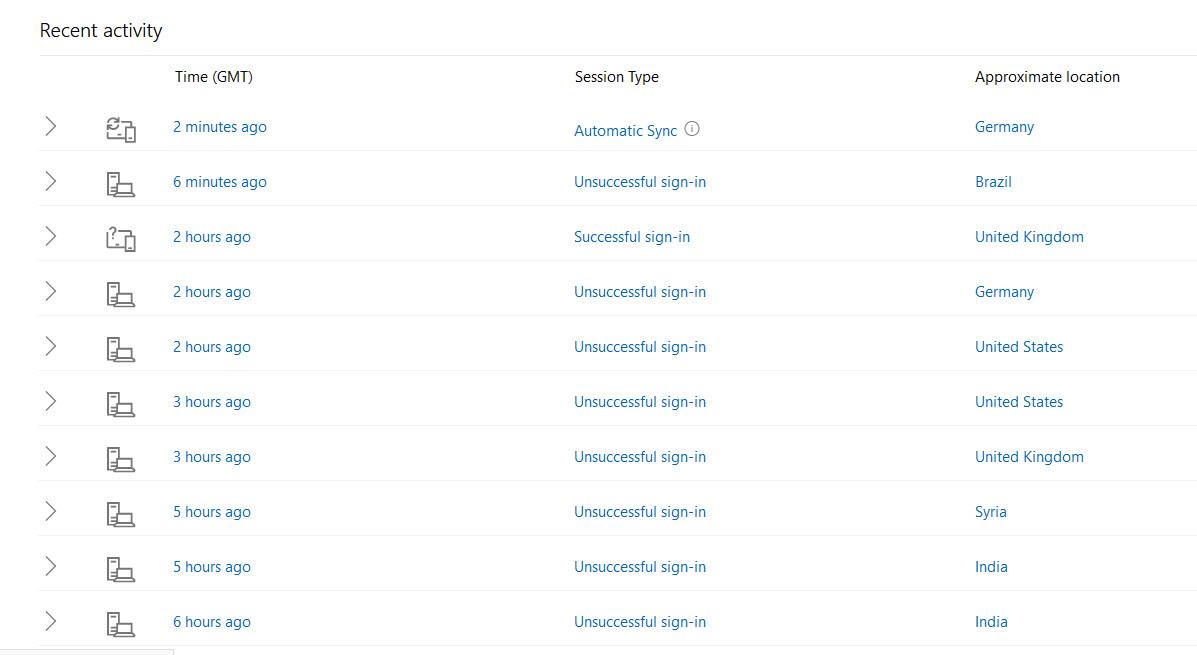
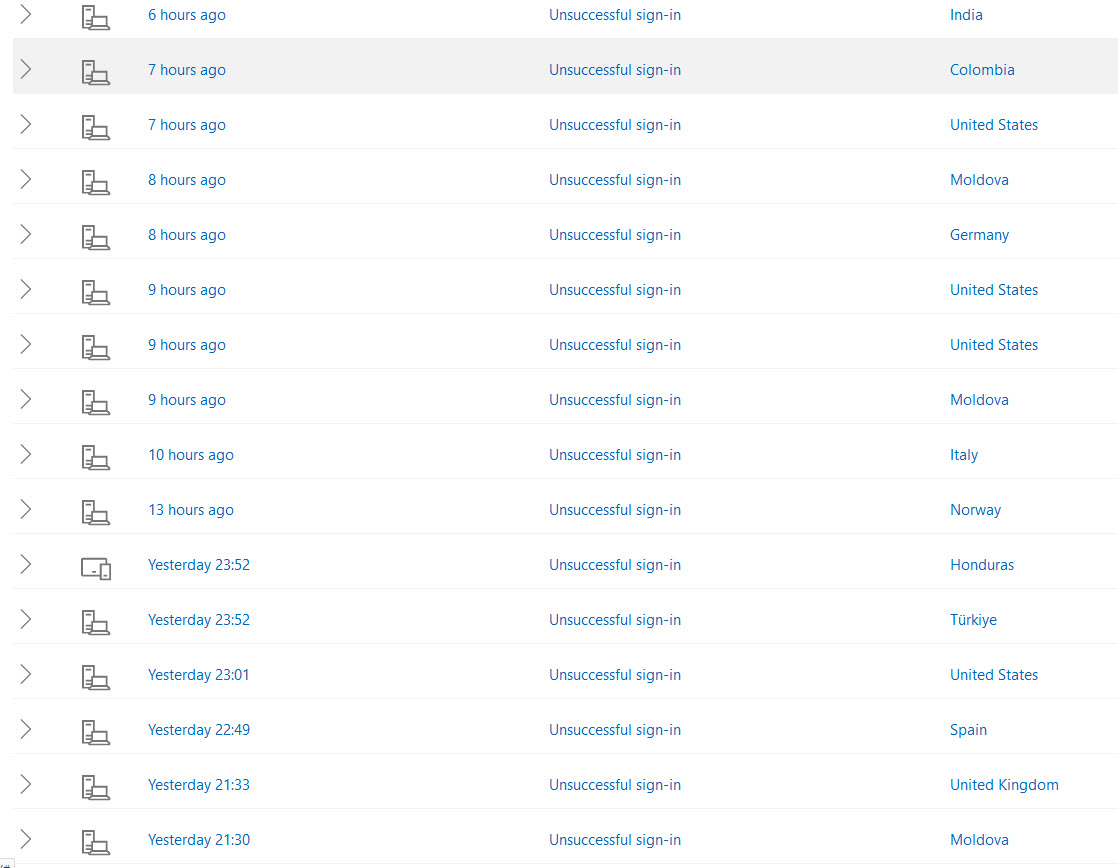
    here's more 20 year old hotmail account being repreatedly hammered, it has a unique password different to any other password used elsewhere but it had a basic passwrd before thats leaked into the dark web so all these hackers are hammering hotmail with the leaked password.

    hack1.jpg

    hack2.jpg

    hack3.jpg
     
    Upvote 0

    gpietersz

    Free Member
  • Business Listing
    Sep 10, 2019
    2,788
    2
    744
    Northwhich, Cheshire
    pietersz.net
    login lockdown methods work to an extent. you will need to set to to apply the repeated failed attempts on all IP addresses.
    How do you do that without locking out legitimate users?

    You can whitelist IPs you know are legit but that will cause problems with dynamic IPs.

    If you have enough control over a system you might be able to limit access to a VPN, but I think OP is using shared hosting.

    if you are the only user on a server you admin you can limit access to localhost and use an ssh tunnel. Again, not going to work on shared hosting.
     
    Upvote 0

    fisicx

    Moderator
    Sep 12, 2006
    46,866
    8
    15,482
    Aldershot
    www.aerin.co.uk
    @gpietersz - what do you do to keep your server secure? You mentioned tools in an earlier post but didn't say what.
     
    Upvote 0

    KM-Tiger

    Free Member
    Aug 10, 2003
    10,346
    1
    2,893
    Bexley, Kent
    what do you do to keep your server secure?
    Fail2ban works very well. It monitors failed login attempts and blocks the originating IP when certain criteria are met.

    You can set number of attempts, length of ban period, and blocking method. Even ban for longer those that come back after their first ban expires.

    I use it for SSH and all the email ports. Typically I have ~250 IP's banned, but I do have ruthless settings for SSH, as nobody except me has any business connecting by SSH. So if you try you are immediately banned.
     
    Upvote 0

    AndreyM

    Free Member
    Dec 27, 2017
    9
    2
    Hi. Sorry, bit of a long read! I've just finished a basic, static site using Wordpress for a client and I use "Limit Login Attempts" and (luckily) "Duo" which allows me to permit or deny access as an alert gets sent to my phone (in case by some fluke the right username and password are guessed). For some reason, it has quickly become the subject of a repeated number of attempts to hack in and gain access.

    I was told a long while ago that hackers start out on smaller sites to gain their knowledge before targeting bigger and more well-known sites. 2 weeks ago I was alerted to 622 attempts in the space of 24 hours and the total number of attempts to date stands at 998!

    Now, I'm in no way a massive corporate company. I'm a freelance who provides design and print, and also web design. Never before has any website that I have created/hosted been the target this many times - is it a growing trend? Or is it just fluke? The website is for a local "Community Interest Company" that aids a multi-generational group who each have various learning needs, so it's not an obvious target.

    Can I ask anyone (if you're still reading this lol!) have you had any similar attacks, seen a trend in targeting smaller sites, or know of an obvious website subject? I'm completely stumped, but as long as I'm using both my defences I seem to be doing okay.

    Many thanks, Si.
    I don't think there are some junior hackers who want to play with a simple website like yours :) There are a lot of bots that find websites they know how to hack and how to abuse them if they manage to hack in. Wordpress has always been a target for such bots. The problem with Wordpress is that you can analyze every line of its code to find a vulnerability. And although the Wordpress code is maybe controlled by the community, there is an enormous amount of plugins people use without thinking about how they are built and whether they are safe. It will always be a problem.

    In your case, if you're talking about the admin login, you can just hide the admin panel entirely. Limit access by IP-address, add basic authentification, etc. (But not via installing more plugins, please), if that's user login, a hidden captcha may be a good solution.
     
    Upvote 0

    fisicx

    Moderator
    Sep 12, 2006
    46,866
    8
    15,482
    Aldershot
    www.aerin.co.uk
    If you install Wordfence free you can use the inbuilt two factor for logins :)
    Yes, but that doesn’t block the hacking attempts. You need to do this at server level.
     
    • Like
    Reactions: WebDesires
    Upvote 0

    fisicx

    Moderator
    Sep 12, 2006
    46,866
    8
    15,482
    Aldershot
    www.aerin.co.uk
    Personally, I always feel very uncomfortable when my account is hacked. I feel like I'm in a horror movie and someone wants to kill me.
    If you have been hacked more than once you need to fix your security.
     
    • Like
    Reactions: ChrisLambert
    Upvote 1

    gpietersz

    Free Member
  • Business Listing
    Sep 10, 2019
    2,788
    2
    744
    Northwhich, Cheshire
    pietersz.net
    If you have been hacked more than once you need to fix your security.
    Definitely agree!

    Have been responsible for multiple client systems for over 20 years. two hacks in that time.

    1. One non-profit used Wordpress because they could find volunteers to do it for free. I knew they would not maintain it and advised against it. WP install and user got hacked, the rest of the server was not.
    2. A server that was the target of politically motivated attacks. I did not admin that particular server but helped with new install. They did have a hardened kernel etc. so its was they were trying not blatant carelessness (a bit sceptical about the hardened kernel myself but...) - a determined attack found an OS flaw (cannot remember the details).
     
    Upvote 0

    fantheflames

    Free Member
  • Business Listing
    Nov 23, 2022
    490
    150
    Bristol
    fantheflames.co.uk
    Completely agree here, setting up server-level protections and installing security plugins like Wordfence can help mitigate these attacks. Make sure to regularly update your software and monitor your website. I find custom login links helps. As many countermeasures you can put in place the better. Some attacks are very difficult to fix.
     
    Upvote 0
    Yes, but that doesn’t block the hacking attempts. You need to do this at server level.
    Totally agree. This is why cheap hosting sucks, you need a server with proper built in intelligent security solutions such as ModSecurity and Immunify which are my 2 favourite server level security services.
     
    • Like
    Reactions: fisicx
    Upvote 0

    Latest Articles