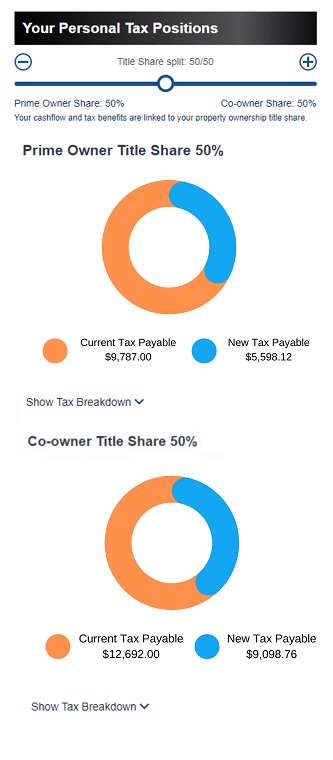
In my mind the 2 different colours are showing relative sizes of old and new tax bill
I dont actually like it as using a circle give the impression it is percentages of a whole, ...
Yes, that's what it is.
@fisicx - unless I'm missing something somewhere, it is not clear exactly what your client is trying to model.
Ignoring the context for the time being, then, generally, it is a distribution of a total t between two variables a and b.
Informal proof:
Graphic 1:
( 9787 / ( 9787 + 5598.12 ) ) * 100 = 63.61
( 5598.12 / ( 5598.12 + 9787 ) ) * 100 = 36.38
A quick visual check suggests that the orange portion occupies about 63.61% of the ring, and the blue portion occupies about 36.38%. These percentages sum to 100%.
Graphic 2:
( 12692 / ( 12692 + 9098.76 ) ) * 100 = 58.24
( 9098.76 / ( 9098.76 + 12692 ) ) * 100 = 41.76
A quick visual check suggests that the orange portion occupies about 58.24% of the ring, and the blue portion occupies about 41.76%. These percentages sum to 100%.
For more precision, you can of course use the basic maths for circles, angles, etc., or calculate the percentages with a protractor, or even use bits of string and blu-tack!
If this is what your client wants to model, then your ring chart is perfectly fine and represents the data nicely. I would place the label for t in the middle of the ring, and perhaps label the bendy-bars with their respective percentages. Also, if possible, you should straighten the rounded edges of the blue and orange bendy-bars.
Now test the graphics to see whether they work as a representation of one of the variables a or b as a proportion of the other. Actually, the test above shows that this won't work, but do it anyway to convince yourself.
My last point is what the graphic on your website is:
( 19249.92 / 24967 ) * 100 = 77
The blue variable has a value of 77% of the orange variable, which looks just about right on your graphic.
So, the two data models are entirely different. The first is a distribution of a quantity between two variables. The second (on your site calculator) is a representation of New Tax Payable as a proportion of Current Tax Payable.
Hope this helps. Please get back to us if you find out what the context is! Perhaps an accountant can help you with this.