Reclaim VAT on employee mileage claim

Newchodge

Moderator
  • Business Listing
    Nov 8, 2012
    22,637
    8
    7,949
    Newcastle
    Another 'how to' request, please.

    Director employee uses own car for business mileage and is paid at HMRC rate 45p. They provide VAT receipt for fuel puchased during mileage claim period.

    I understand that input VAT can be claimed using the advisory fuel rate for the vehicle used, to give the amount claimable.

    So how do I actually claim the input VAT? What do I put in the accounts softeare - usually the Director's expenses claims are journaled to their DLA.

     

    Ziggy2024

    Free Member
    Jul 26, 2024
    302
    1
    101
    You have to overwrite the VAT in the software so you have mileage calculated at AMAP rate (45p) and the VAT is calculated at AFR / 6 to give you the claimable amount.

    Eg 1000 miles would be £450 to employee
    VAT on a 2cv engine petrol would be 1000 x 24p / 6 = £40 claimable as input VAT.
     
    Upvote 0

    David Griffiths

    Free Member
  • Jun 21, 2008
    11,553
    3,669
    Cwmbran
    The easiest way is to post the claim split into two lines. Say the payment is for 500 miles and the approved rate for the fuel is 13,

    Enter the first line described as mileage fuel rate 500 @13p. VAT standard rate
    And the second line as mileage "base" rate (or whatever) 500 @32p No VAT.

    You will vary the rates as the fuel rate goes up and down, but it will always come back to the total rate of 45p. Saves faffing about with manual calculations on the fuel element,

    Most software will allow you to process the one payment split between two elements.
     
    • Like
    Reactions: Ziggy2024
    Upvote 0

    Ziggy2024

    Free Member
    Jul 26, 2024
    302
    1
    101
    The easiest way is to post the claim split into two lines. Say the payment is for 500 miles and the approved rate for the fuel is 13,

    Enter the first line described as mileage fuel rate 500 @13p. VAT standard rate
    And the second line as mileage "base" rate (or whatever) 500 @32p No VAT.

    You will vary the rates as the fuel rate goes up and down, but it will always come back to the total rate of 45p. Saves faffing about with manual calculations on the fuel element,

    Most software will allow you to process the one payment split between two elements.
    Good shout. I'm using a software at the moment that doesn't allow you to post gross so you have to work out the net and check the VAT so didn't even think to split it on 2 lines!
     
    Upvote 0

    Newchodge

    Moderator
  • Business Listing
    Nov 8, 2012
    22,637
    8
    7,949
    Newcastle
    The easiest way is to post the claim split into two lines. Say the payment is for 500 miles and the approved rate for the fuel is 13,

    Enter the first line described as mileage fuel rate 500 @13p. VAT standard rate
    And the second line as mileage "base" rate (or whatever) 500 @32p No VAT.

    You will vary the rates as the fuel rate goes up and down, but it will always come back to the total rate of 45p. Saves faffing about with manual calculations on the fuel element,

    Most software will allow you to process the one payment split between two elements.
    2 lines of a journal to the DLA, or do I have to pay the employee as a supplier?
     
    Upvote 0
    2 lines of a journal to the DLA, or do I have to pay the employee as a supplier?
    I normally use David Griffiths' 2 line split in a 'Spend Money' transaction, which is what Xero calls it, as opposed to a Supplier Bill, as such.
    If you can tell me which software it is I might be able to tell you what your sofrware calls a 'Spend Money' transaction.
     
    Upvote 0

    Newchodge

    Moderator
  • Business Listing
    Nov 8, 2012
    22,637
    8
    7,949
    Newcastle
    I normally use David Griffiths' 2 line split in a 'Spend Money' transaction, which is what Xero calls it, as opposed to a Supplier Bill, as such.
    If you can tell me which software it is I might be able to tell you what your sofrware calls a 'Spend Money' transaction.
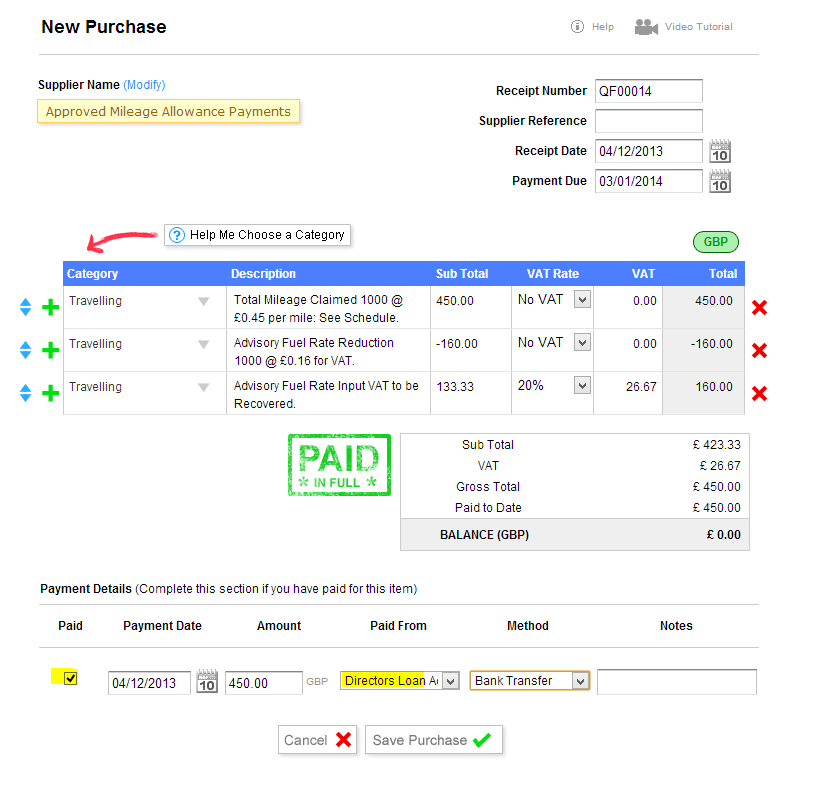
    Thanks. It's Quickfile, I assume it is enter new purchase
     
    • Like
    Reactions: numbersrule
    Upvote 0

    Newchodge

    Moderator
  • Business Listing
    Nov 8, 2012
    22,637
    8
    7,949
    Newcastle
    I have issued a purchase "invoice" from the Director, showing Mileage claim and VAT. When I pay the Mileage claim to the Director it leaves an outstanding balance of VAT. How do I deal with the outstanding amount shown as due to be paid to the Director, please?

    I suppose I should go on a book keeping course, but I don't have time!
     
    Upvote 0

    MyAccountantOnline

    Business Member
    Sep 24, 2008
    15,215
    10
    3,300
    UK
    myaccountantonline.co.uk
    I have issued a purchase "invoice" from the Director, showing Mileage claim and VAT. When I pay the Mileage claim to the Director it leaves an outstanding balance of VAT. How do I deal with the outstanding amount shown as due to be paid to the Director, please?

    I suppose I should go on a book keeping course, but I don't have time!

    I dont use Quickfile and someone else who does may be able to give you a better reply but when you enter the invoice you should be able to enter the invoice total and overwrite the VAT the system will calculate (ie 20%) with the actual amount recoverable. If you do that when its paid to the director it will clear the invoice total.
     
    Upvote 0

    Newchodge

    Moderator
  • Business Listing
    Nov 8, 2012
    22,637
    8
    7,949
    Newcastle
    I dont use Quickfile and someone else who does may be able to give you a better reply but when you enter the invoice you should be able to enter the invoice total and overwrite the VAT the system will calculate (ie 20%) with the actual amount recoverable. If you do that when its paid to the director it will clear the invoice total.
    Thanks Nicola. I have the invoice showing the claim as miles * 31p no VAT and miles * 14p with VAT. So I pay the Director miles * 45p, leaving a VAT amount showing as owing to the Director. Obviously it is not owed to the Director.
     
    Upvote 0

    MyAccountantOnline

    Business Member
    Sep 24, 2008
    15,215
    10
    3,300
    UK
    myaccountantonline.co.uk
    Thanks Nicola. I have the invoice showing the claim as miles * 31p no VAT and miles * 14p with VAT. So I pay the Director miles * 45p, leaving a VAT amount showing as owing to the Director. Obviously it is not owed to the Director.

    If you can in Quickfile I'd enter the invoice total and then the VAT recoverable on the total on one line.

    So if for example the claim is for 100 miles the invoice total will be £45 I suspect Quickfile will then show VAT recoverable of £7.50 and you'd overwrite that with the VAT actually recoverable.
     
    Upvote 0

    MyAccountantOnline

    Business Member
    Sep 24, 2008
    15,215
    10
    3,300
    UK
    myaccountantonline.co.uk
    Just done a bit of Googling - Quickfile has a rather odd way of recording this but this seems to explain how they do it

     
    Upvote 0

    Newchodge

    Moderator
  • Business Listing
    Nov 8, 2012
    22,637
    8
    7,949
    Newcastle
    Just done a bit of Googling - Quickfile has a rather odd way of recording this but this seems to explain how they do it

    Thanks Nicola, I didn't think to check how Quickfile does it, duh! :p
     
    • Like
    Reactions: MyAccountantOnline
    Upvote 0

    Bobbo

    Free Member
    Jul 7, 2020
    435
    1
    135
    Thanks Nicola. I have the invoice showing the claim as miles * 31p no VAT and miles * 14p with VAT. So I pay the Director miles * 45p, leaving a VAT amount showing as owing to the Director. Obviously it is not owed to the Director.
    You may already have solved it with the link provided by Nicola, but where if you're finding the VAT amount is being left outstanding then is it because you have been treating the "14p with VAT" as being 14p plus VAT? When actually the 14p is inclusive of VAT, i.e. is 11.67+VAT.
     
    Upvote 0

    Latest Articles