How difficult is admin in magento 2 compared with m1?

Countrymun

Free Member
Sep 13, 2014
153
17
England
Hi,
We are planning to move to magento 2 but a relative just alerted me to a message on a small business forum that she uses. Someone was warning that M2 is no good for a small business (like ours) because of "all the troubles that come with M2".

This is obviously worrying but no idea if there's even any truth in it. The person commenting was I think trying to sell someone on a different e-commerce solution but just wondering if anyone who has migrated to 2 could comment - preferably someone with techy skills as limited as my own :)

I can ;process orders/invoices, change email templates and add simple products and upload images etc on M1 but that's about the extent of my current capabilities.
Thanks as always for any input.
 

zigojacko

Free Member
Dec 7, 2009
3,795
1,222
Plymouth, UK
clubnet.digital
It really does depend on how complex your store will be. For general administration of the Magento 2 backend, it is relatively easy to get to grips with in comparison to Magento 1 - although I wouldn't really say they made anything easier, if anything, it's probably in fact more long-winded and time consuming to work with.

The problems come when you need to make changes to content on your pages depending on how your theme has been constructed. If it requires changing widgets and markup directly in the editor then the website owners lacking "techy skills" will tend to struggle or find it to easy to break things.

The agency I am from has worked with Magento pretty much since the start and I found myself quite disappointed with the platform, especially considering the complications that came with Magento 1, I don't feel Magento 2 was an improvement at all (and I speak purely from a management/interface/functionality point of view - there are of course improvements in terms of stability and performance, when developed right however).

My honest advice is that in most cases of websites running on Magento 2, you will need a developer on hand that knows how to work with the platform. You can clear cache in the backend now for small changes made also in the backend but for any changes to the theme and template files, you'll require CLI access over SSH for running Magento 2 commands / composer (etc) depending on setup etc.

Almost all 'off-the-shelf' themes are problematic (I mean, they almost always are in any CMS/ecommerce platform) so it really does depend on how you will set your website up on the platform, whether you are having your existing theme rebuilt for Magento 2 or will try to keep costs down by using an off-the-shelf theme and whether you work with a Magento 2 developer that can provide you with an easy to use interface in the backend so thing can't break.

We have (or still are) performed at least 10 Magento 1 => Magento 2 upgrades. Many of them become quite complicated. Most of them incur costs upwards of £1k.

Hope that's of use. Feel free to get in touch directly if you want any further specific advice that will help you decide the best route to take.
 
Upvote 0

Countrymun

Free Member
Sep 13, 2014
153
17
England
Hi @zigojacko - thank you for taking the time for such a comprehensive reply.
I am not technical and at the minute we usually have to pay when a patch needs to be installed. However it isn't a particularly complex store (says this non-techy person!)
It would be good to know more about user friendly interface in the backend. Our current M1 version now has a wysiwyg editor which has made it easier for me to increase text size in product descriptions etc more easily than I could previously. Would the type of user interface you mention add significantly to the setup cost of a M2 site?
Thank you again for your help.
 
Upvote 0

zigojacko

Free Member
Dec 7, 2009
3,795
1,222
Plymouth, UK
clubnet.digital
Hi @zigojacko - thank you for taking the time for such a comprehensive reply.
I am not technical and at the minute we usually have to pay when a patch needs to be installed. However it isn't a particularly complex store (says this non-techy person!)
It would be good to know more about user friendly interface in the backend. Our current M1 version now has a wysiwyg editor which has made it easier for me to increase text size in product descriptions etc more easily than I could previously. Would the type of user interface you mention add significantly to the setup cost of a M2 site?
Thank you again for your help.

No problem.

Things like font size shouldn't be changed in the WYSIWYG editors, this is kind of the point I am getting at, if you're having to do this then your theme hasn't been built right for you. All of this should be handled in global stylesheets that apply across your website. As soon as you have to start changing things like this in the editor, things go wrong and end up being inconsistent across your website.

It's hard for me to comment without seeing your website but in basic terms, any content generated by yourself in the backend should be provided via attributes so all of the HTML markup is controlled via the template files on the server and just load the attributes if they exist which is where you add your content (literally just words and images) - everything else should be handled by the theme.

Of course, you don't have to do it like this, but your website will be very susceptible to problems if you're trying to control a lot of your page design, styles and aesthetics from the editor.
 
Upvote 0

zigojacko

Free Member
Dec 7, 2009
3,795
1,222
Plymouth, UK
clubnet.digital
No problem.

Things like font size shouldn't be changed in the WYSIWYG editors, this is kind of the point I am getting at, if you're having to do this then your theme hasn't been built right for you. All of this should be handled in global stylesheets that apply across your website. As soon as you have to start changing things like this in the editor, things go wrong and end up being inconsistent across your website.

It's hard for me to comment without seeing your website but in basic terms, any content generated by yourself in the backend should be provided via attributes so all of the HTML markup is controlled via the template files on the server and just load the attributes if they exist which is where you add your content (literally just words and images) - everything else should be handled by the theme.

Of course, you don't have to do it like this, but your website will be very susceptible to problems if you're trying to control a lot of your page design, styles and aesthetics from the editor.

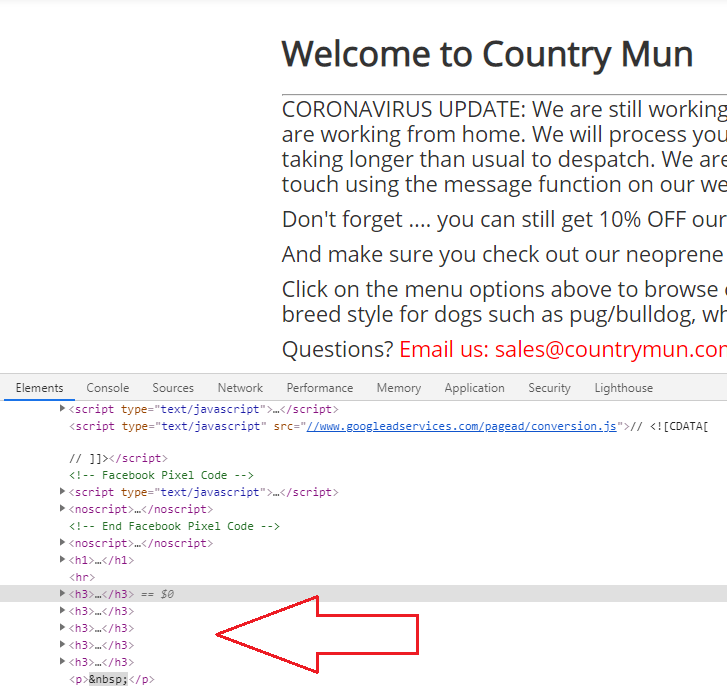
@Countrymun I took a quick look actually myself...

countrymun.png


This example is exactly what I am saying. You've made every paragraph here on your homepage a heading 3 (<h3>) where you've tried to increase the font size in the editor which is poor practice and not semantically correct. This issue is probably apparent all throughout your website.

In this particular example, a new attribute should have been created for you to add a coronavirus notice to your website marked up with it's own class, styled from the global stylesheets and then in your backend, you just add your text copy.

By modifying any content like this directly in the backend editors, you're stuck with it through every migration/update unless you manually go into each page/product/category and change it - this, as you can imagine, will prove a ridiculous task if you have a lot of website content.

Hope that helps.
 
  • Like
Reactions: Countrymun
Upvote 0
as @zigojacko has stated. These issues should be accommodated for in your theme from the start and if you want new components then block components then these should be styled properly in the theme. Once set up magento can be a very powerful tool but it is a beast under the hood and can suck up server resources quickly. It also does need expert development skills, sometimes just to do some simple things.

In terms of the back end it is basically the same, just more modern looking. The main reason for migration from 1 to 2 is that 1.x is not going to be supported anymore, so no security updates.

You could use a different e-commerce solution but if you are already on magento it is difficult to see what your benefit would be except for reduced ongoing maintenance and development costs. the cost savings of moving platforms in comparison to migrating between magento versions maybe negligible as you would have to factor in the cost of data migration to the new platform as well.

Maybe you should do some research on e-commerce solutions and see if there is one that would be a better fit to your business but generally it is a question of 6 of one and half a dozen of the other.
 
  • Like
Reactions: Countrymun
Upvote 0

Latest Articles

Join UK Business Forums for free business advice