Royal Mail Click & Drop Dropbox -> API & No Labels?!

joshgeake

Free Member
Jul 25, 2013
158
26
Hi all,

So after about 12 hours of coding to get the Royal Mail Click & Drop API working with our backend (as Royal Mail are retiring the Dropbox API imminently) we hit a snag...

Apparently, Royal Mail's API can't generate labels by itself. Users need to manually sign into Click & Drop, click on 'Generate Label' and then do that again, potentially for every single shipping label.

I am in total disbelief that Royal Mail has backed its users into this corner and sat, jaws open, as the telephone operator told me all the grim details.

Has anyone found a way around all this? All I want are labels without having to login to Click & Drop!
 

DefinitelyMaybeUK

Free Member
Jan 12, 2021
297
72
Try Pro Shipping instead of Click and Drop
Pro Shipping would be great, but requires 100+ items a day and out of touch for some users.

I agree with with the OP, it's a backwards step from RM, but they repeatably argue that it's not going to happen - check out the numerous posts on the user forum (which haven't been closed off and hidden): https://clickanddrop.uservoice.com/

There is no solution to the problem AFAIK and manual intervention via the website is the only way. Some people have gone down the desktop app route which is totally nuts for what should be a web-connected backend world!

I can only see RMs real reason for not just adding a "Print Labels Automatically" checkbox to the API integration (akin to the fundamentally working Dropbox integration) is that they are trying to flog their new "ChannelShipper" solution for a monthly fee depending on usage: https://channelshipper.com/

This is still in trial by the looks of it - and to the casual eye is Click and Drop coloured blue instead of red, but you get the option to pay for the privilege of using their post system and the API suggests it will return the label PDFs directly. Grrr.
 
Upvote 0

joshgeake

Free Member
Jul 25, 2013
158
26
Yes, a total joke. Why would they allow you to create an order but not generate the paperwork? To charge you £50+ via a separate subscription!

Not to worry, I wrote a quick and dirty translation function afterwards to dump it into an output file.

What a joke, eh? Still, the stories my mate (that used to be a postman) tells me about Royal Mail makes the above all sound perfectly reasonable!
 
Upvote 0

antropy

Business Member
  • Business Listing
    Aug 2, 2010
    5,313
    1,099
    West Sussex, UK
    www.antropy.co.uk
    I am in total disbelief that Royal Mail has backed its users into this corner and sat, jaws open, as the telephone operator told me all the grim details.
    If you were on the phone to them they were unlikely a senior developer of the API. You might be better going through email / a support ticket system to try and escalate higher up.

    Paul.
     
    Upvote 0

    DefinitelyMaybeUK

    Free Member
    Jan 12, 2021
    297
    72
    You might be better going through email / a support ticket system
    This has been done previously and there was at least two well contributed tickets on the uservoice forum with regards to the API short falls where others have had flat denials from RM technical. But I've just looked and the tickets references I had have been closed and subsequently deleted - even my specific feedback posts are no longer showing in my account - RM has a lot to answer for when it comes to transparency.
     
    Last edited:
    Upvote 0

    DefinitelyMaybeUK

    Free Member
    Jan 12, 2021
    297
    72
    I wrote a quick and dirty translation function afterwards to dump it into an output file.
    That sounds good if you want the label PDF data, but I'd settle for just having the system perform the "generate label" function to avoid the (unnecessary) UI login as we use Print Assist (aka PrintNode) on a workstation and it kicks the labels out directly to our Zebra printer and works a treat otherwise.
     
    Upvote 0

    joshgeake

    Free Member
    Jul 25, 2013
    158
    26
    Yes, I contacted Channel Shipper and once I mentioned Royal Mail they (weirdly?!) said they couldn't help and immediately cancelled my support ticket. They didn't even bother replying when I started another. It's clearly a common issue!

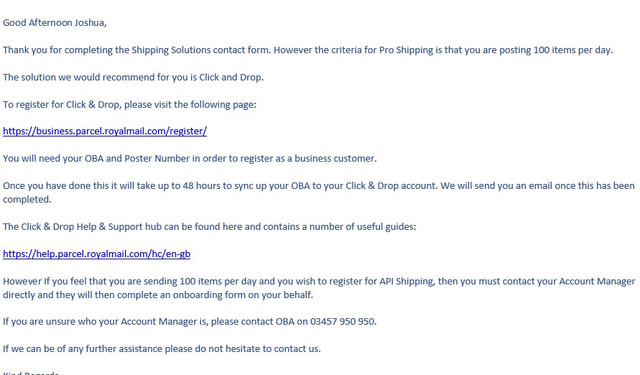
    I also tried to get Pro Shipper but they're not budging. I've asked my "account manager" but I don't hold much hope.

    Screenshot-2021-09-28-141735.jpg


    It seems a bit of a scam that their system has allowed us to use web services to authorise, upload data, create an order and set all the details ... but not print the damn label.

    Ah well, file exchange it'll have to be.
     
    Upvote 0

    Zade1975

    Free Member
    Oct 1, 2013
    10
    2
    Sorry not sure what you mean by "Does not print them automatically"?

    As I said we send a CSV from our system (Access based) straight to the listening folder and the label prints automatically, we don't interact with C&D until we print the manifest at the end of the day
     
    Upvote 0

    DanH

    Free Member
  • Jan 5, 2010
    247
    33
    That does seem backward. I did have this from Click and Drop support back in December 2020 when I was looking for guidance on the API and printing API imported batches:

    "The orders are easily accessible once imported. You can locate the orders directly from your dashboard. If you want to make the process more streamline, I would advise to include the package weight, size and service within the import as the orders will then feed through as orders ready for printing, and then if you are using Print Assist, the labels will print automatically with no manual input."

    which seems to imply that Print Assist works with API created imports.

    We're going ahead with the Desktop version first as I don't quite trust the infancy of the API.

    On that note Zade1975, you said you're using an Access based system to output the CSV files to the watch folder -do you ever have any issues with that? I'm experimenting with Access for exporting CSVs at the moment but some of my exports via Access directly to the watch folder get uploaded as files with only header information i.e. missing the orders information. If I generate CSV outside the watch folder and then subsequently drop in to the watch folder, no issues. I have a support request open with C&D support but not had anything back yet.

    Dan
     
    Upvote 0

    joshgeake

    Free Member
    Jul 25, 2013
    158
    26
    That does seem backward. I did have this from Click and Drop support back in December 2020 when I was looking for guidance on the API and printing API imported batches:

    "The orders are easily accessible once imported. You can locate the orders directly from your dashboard. If you want to make the process more streamline, I would advise to include the package weight, size and service within the import as the orders will then feed through as orders ready for printing, and then if you are using Print Assist, the labels will print automatically with no manual input."

    which seems to imply that Print Assist works with API created imports.

    We're going ahead with the Desktop version first as I don't quite trust the infancy of the API.

    Dan

    I can tell you from experience that even with the service, service format and full parcel dimensions, it doesn't print the label automatically. It's a real shame to be honest because the API's import functionality is faultless.
     
    Upvote 0

    joshgeake

    Free Member
    Jul 25, 2013
    158
    26
    Also, if I look at the API documentation for creatng an order I see this:

    object (LabelGenerationRequest)
    Reserved for ChannelShipper customers only - please visit ChannelShipper.com for more information

    ..which might explain what they're up to!

    That relates to returning the PDF as part of the API's exchange. Print Assist simply prints the labels once the postage has been applied.

    The tell-tale sign is that Dropbox and Click & Drop Desktop can be set to 'print labels automatically' but the API has no such setting.
     
    Upvote 0

    joshgeake

    Free Member
    Jul 25, 2013
    158
    26
    Hi, just been speaking to Click and Drop on a Desktop related issue and they've told me that the API will receive an update on Friday that will retrieve the label. So that's potentially good news!

    Excellent - thank you for letting me know.

    Assuming they get everything working then I'll try integrating it at the end of the month and let you know how it goes. All the code is there, it just needs to be enabled.
     
    Upvote 0

    DefinitelyMaybeUK

    Free Member
    Jan 12, 2021
    297
    72
    Amazingly, it looks like the API has been updated and true to form it's still version 1.0.0 - haven't tried the new label generation or label pdf retrieve yet, but on the face of it, it's now been enabled for OBA customers and not just reserved for ChannelShipper folk. Still missing the order delete enablement, but this is a welcome step forward that should of been there from the outset.
     
    Upvote 0

    DanH

    Free Member
  • Jan 5, 2010
    247
    33
    Can I ask a question to those that are using the API? I'm trying to get our Desktop C&D working however the price list for international tracking codes can be a bit vague for some countries where they won't take MP7 tracked but may use one of the other MTE/MP9 services (tracked and sigend/signed). I obviously have to feed the CSV the service code before it hits C&D otherwise it then requires manual postage application. How are you handling this scenario (if at all) with the API?
     
    Upvote 0

    DefinitelyMaybeUK

    Free Member
    Jan 12, 2021
    297
    72
    the price list for international tracking codes can be a bit vague for some countries where they won't take MP7 tracked but may use one of the other MTE/MP9 services (tracked and sigend/signed)
    Don't think there's anything vague about, as they're all defined and there's a list in Appendix B of the International Business Parcels User Guide PDF, see page 55:
    https://www.royalmail.com/business/international/services/international-business-tracked
    We base our website shipping rules on preferring Tracked services first (i.e. Tracked No Signature), then fall back to Tracked & Signed (i.e Tracked with Signature), then default to Signed for any country not specifically defined as a Tracked or Tracked & Signed. The PDF on the RM site doesn't mention the new MT7/MTE/MP9 codes, but these replace the MP1/MTA/MP5 respectively. It may look daunting, but the number of countries using Tracked services (both types) is quite low in the scheme of things and relatively easily defined - just don't forget the catch all signed fall back.

    How you determine in your application whether a shipping country needs a MT7, MTE or MP9 serviceCode is exactly the same method irrespective of your integration method, i.e. CSV for upload or calling the API directly.
     
    • Like
    Reactions: DanH
    Upvote 0

    DanH

    Free Member
  • Jan 5, 2010
    247
    33
    Thanks for that! I haven't been pointed to that document yet, all I've had is the price list with an MP7 column plus an MTE/MP9 column which is an either/or. I've had a couple of conversations with my account manager and also Click and Drop support who recognised the lack of information I had and both pointed me to looking up the country on the RM website i.e. country by country!

    Thanks again for that, you've saved me a lot of time, I'll put you forward for a job at Royal Mail! Seriousy though, this is the reason I come to the forums as I can't ever quite trust what they tell me...:(
     
    Upvote 0

    DefinitelyMaybeUK

    Free Member
    Jan 12, 2021
    297
    72
    I was told it did not exist!
    The truth is out there...

    Makes you wonder how RM exist as a business doesn't it?

    Just watch out that the services that a country supports can change occasionally and (to their credit) RM have been quite good as emailing out the details. Generally these are countries that now support the (more efficient) Tracked service, and as such either the previous Tracked & Signed, or Signed only service then stops being valid - Czech Republic springs to mind as a country that went Tracked a year or so back.
     
    Last edited:
    Upvote 0

    DanH

    Free Member
  • Jan 5, 2010
    247
    33
    Thanks, they did warn me of this when they were talking me through the price list so I am aware that certain countries may change services. This is why I believed them when they said such a list was not available other than what I could see on the price list. Buggers.
     
    Upvote 0

    DefinitelyMaybeUK

    Free Member
    Jan 12, 2021
    297
    72
    FYI, the API still doesn't support printing labels automatically.
    Yes, that's true, but (and I've yet to complete the loop on this so could be wrong as ever!) you can now retrieve the C and D label (including CN22 etc) and then either send them to your own local printer, or as I intend, to fire them off to my existing RM Print Assist account (which RM creates for you, aka PrintNode) using the PrintNode API, such the labels are printed on the same workstation setup as they currently are.
     
    Upvote 0

    DefinitelyMaybeUK

    Free Member
    Jan 12, 2021
    297
    72
    when your post the order details to the API, it won't generate a label without manual intervention
    The last API update enabled the LabelGenerationRequest call (or so they've documented) which would negate the need for UI intervention - is this not the case?

    or the additional costs associated with a PrintNode account?
    OBA customers can request that PrintAssist is enabled for them for free.
     
    Upvote 0

    DefinitelyMaybeUK

    Free Member
    Jan 12, 2021
    297
    72
    I don't think it's automated though, is it?
    Just to update, I tested this earlier and by including the (now enabled) LabelGenerationRequest object in the usual Orders call, Click and Drop will perform the label generation step automatically and then return the pdf in the response if that's what you want, e.g.:
    "label": { "includeLabelInResponse": true}
    In this example you get a base64 encoded label item in the response that can then be passed onto PrintAssist using the printjobs API call. You can flag the customs labels to be returned as well, but you'd need to handle the A4 printer selection for the CN23 case if you normally default to a Zebra 420 for instance.
     
    Upvote 0

    Latest Articles

    Join UK Business Forums for free business advice