
You are using an out of date browser. It may not display this or other websites correctly.
You should upgrade or use an alternative browser.
You should upgrade or use an alternative browser.
Inserting a file
- Thread starter Newchodge
- Start date






Hi Cyndy, I do thisI think I have asked this before but the answer is not obvious. I have a screenshot saved as a png file. How do I include that in a post?
- Go to imgur.com
- top-left, click on "New post"
- (follow the instructions on how to upload)
- Once screenshot is uploaded, I prefer to right click on it and open in a new tab
- Now copy the address, which must end in .png (or other extension)
- then go back to the post, click on the img icon and upload
Upvote
0



Depends who or where you want to insert the file into.
I mean...
Or alternatively:
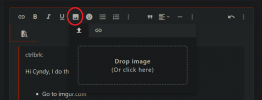
On the posting box, click the New Image icon (fifth icon on the top row on the left). Drag your file into the "Drop image" box.

Job done.
I mean...
Hi Cyndy, I do this
- Go to imgur.com
- top-left, click on "New post"
- (follow the instructions on how to upload)
- Once screenshot is uploaded, I prefer to right click on it and open in a new tab
- Now copy the address, which must end in .png (or other extension)
- then go back to the post, click on the img icon and upload
Or alternatively:
On the posting box, click the New Image icon (fifth icon on the top row on the left). Drag your file into the "Drop image" box.
Job done.
Attachments
Upvote
0
Depends who or where you want to insert the file into.
I mean...
Or alternatively:
On the posting box, click the New Image icon (fifth icon on the top row on the left). Drag your file into the "Drop image" box.
View attachment 2124
Job done.
Not all forums are the same.
This one allows you to just upload an image from your device, others you have to pull it from a URL
Upvote
0
Not all forums are the same.
This one allows you to just upload an image from your device, others you have to pull it from a URL
Maybe they don't trust us peasants.
It's probably a storage issue.
Upvote
0
try adding it to this one 1stI'm in Sales and Marketing. When I click the image it asks for a URL.
then copy the URL address of it
use that address as the URL in the other forum
Edit to add: probably best not doing it this way, I've just tested it, and if you delete the image from a post in this forum it removes the image from the server
Upvote
0

- Original Poster
- #11
Thanks, it didn't work.try adding it to this one 1st
then copy the URL address of it
use that address as the URL in the other forum
Edit to add: probably best not doing it this way, I've just tested it, and if you delete the image from a post in this forum it removes the image from the server
@Ethan39 should all the forums allow simple access to upload a file?
Upvote
0


I copied the image then copied the url in the heading bar.
you need to copy the image link, not just copy the image
Upvote
0


Latest Articles
-
 The Most Dangerous Moment in Business Is When Everything Is Going WellThey Saw It Coming. They Did Nothing. The Lessons Every Business Owner...
- Ozzy
- Updated:
-
AI and Your Business: Useful Tool, Not a Magic WandThere is no shortage of noise around artificial intelligence right now...
- Ozzy
- Updated:
-
Companies House WebFiling security incident: what happened, what to check, and what to do nextCompanies House has confirmed that its WebFiling service suffered a...
- Ozzy
- Updated:
-
Spring Budget 2026: A Quiet Update for UK BusinessesChancellor Rachel Reeves delivered the UK’s Spring Statement on 3 March...
- Ozzy
- Updated:
-
 Practical Ways to Make Your Small Business More Resilient (Especially When the Unexpected Happens)Running a business means juggling plenty of things you can plan for and...
- UKBF Editor
- Updated:
